

Lab balances: mass, load range and proper handling
A lab balance shows a mass. Before you write it down, check three things: what is on the pan, whether the container is included, and whether the number has stopped changing. Pressing tare can make a balance with a container on it read zero, but the container is still sitting on the pan.
Follow the instructions for the balance you are given, and your trainer's directions on how much it can hold, what you may weigh on it, how to set it up and how to clean it. A photo cannot tell you any of that.
How a balance reads mass
A balance senses the downward push on its pan and shows it as a mass. Anything else that pushes or pulls on the pan, or holds part of the load off it, changes the reading even though the sample has not changed. Moving air, a hand resting nearby and a container touching the side are common examples.
The pan holds the object or the container you are weighing into. Many balances have a glass enclosure, called a draft shield, to keep moving air off the pan; how it opens depends on the model. The display shows the reading. Wait for the number to stop changing before you write it down. METTLER TOLEDO's balance guidance explains how to use the draft shield and when a reading has settled.
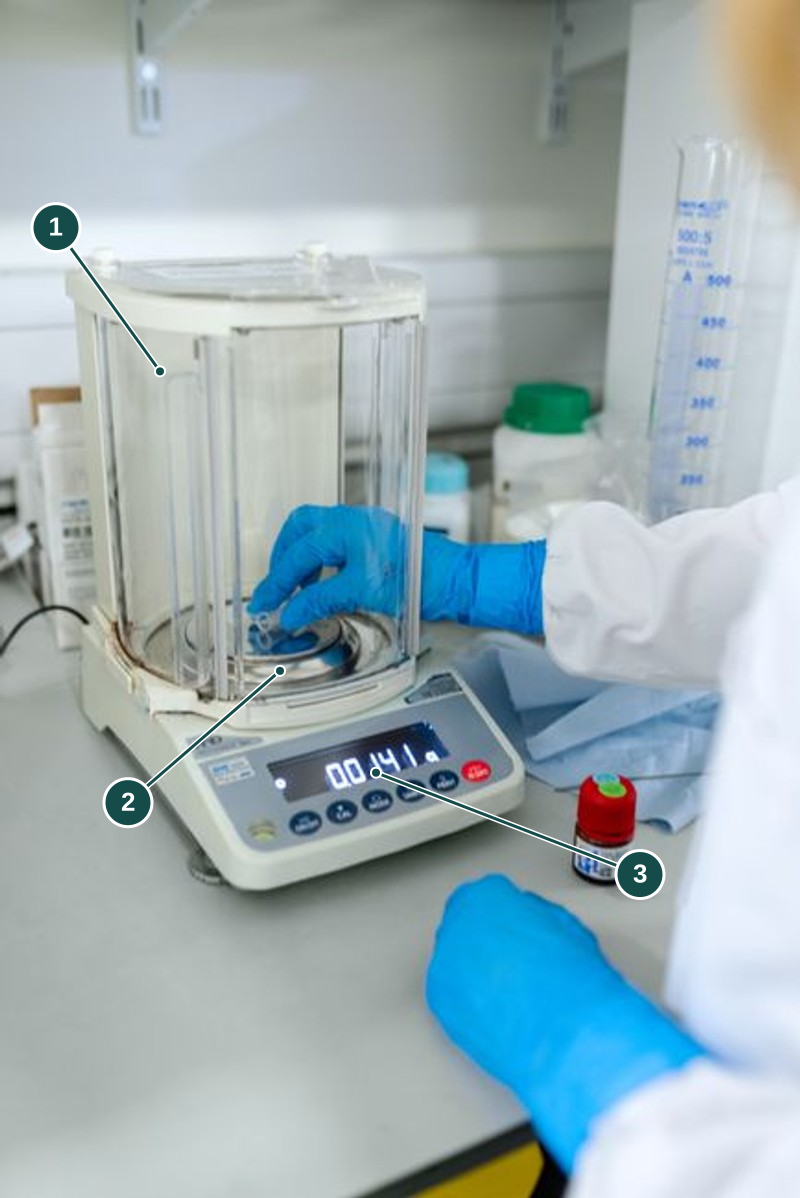
- Enclosure. Surrounds the pan so moving air does not push on it. Open and close it the way you are shown.
- Pan area. Holds the sample and container, up to the balance's limit.
- Display. Shows the reading. Wait until it stops changing before you write it down.
Finish putting things on the pan before you read it. In the photo, a hand is still in the weighing area, so a reading taken at that moment would not be ready to record.
Illustrative photo: ThisIsEngineering on Pexels.
Zero and tare
Zero sets the display to read 0 with nothing on the pan, so later readings count everything you add. Tare sets the display to 0 with your empty container on the pan, so the next reading shows only what you add to it. Some balances use one button for both, but they do different things.
For example, say an empty container weighs 24.6 g, and the container with your sample weighs 31.8 g. Subtract, and the sample is 7.2 g. If you had tared the empty container first, the balance would show 7.2 g straight away, depending on the balance and method. These numbers are made up for the example; they are not read from the photo.
Leave the container on the pan while you weigh. If you take it off after taring, the display may show a negative number. That does not mean the sample has negative mass. Before you press another button, check what the balance is currently set to measure from. The manufacturer's weighing steps show zero and tare as separate steps.
What tare changes, and what it doesn't
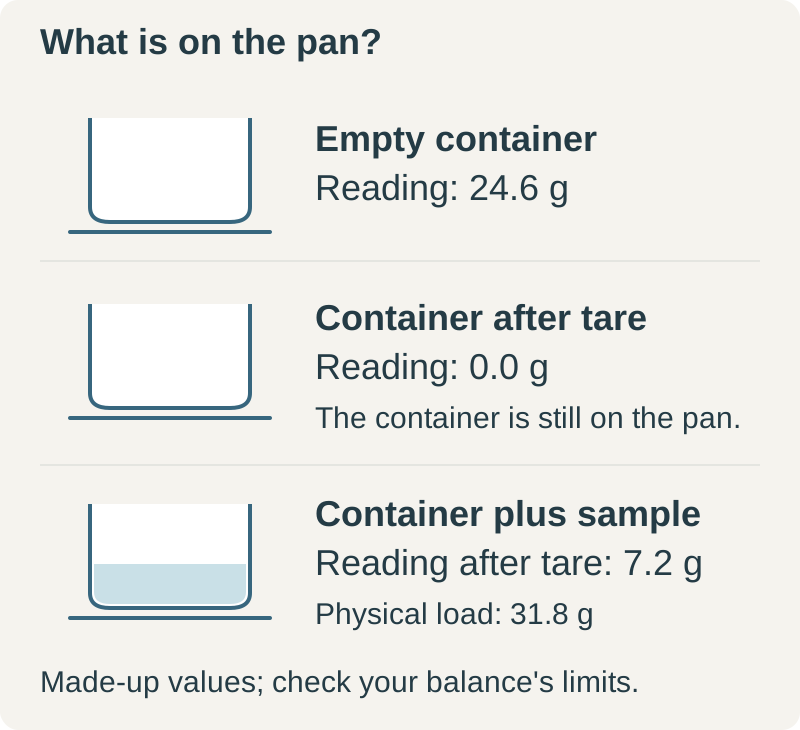
The diagram uses the same numbers as the example above. Tare only changes what the display counts from. The container is still on the pan, and its mass still counts towards how much the balance can hold.
If the method asks for the sample's mass, check whether your reading includes the container. A steady number can still be the wrong mass for your calculation. METTLER TOLEDO's weighing steps show the zero, the tare and the sample reading as separate stages.
Check the load before you weigh
The container and the sample both count towards the balance's limit. The Adam Equipment CPWplus manual, section 6.3 shows how a tared container leaves less room for the sample. Check the limit on your balance; other models have different limits.
A large container can be light enough and still be the wrong size for the pan or draft shield. Ask your trainer for one that fits, rather than letting it hang over the edge, touch the shield or lean on anything. If it touches something else, that contact takes some of the weight and the reading will be wrong.
Weigh liquids and powders in the container you are given, using the method you are shown. Never pour an unknown substance straight onto the pan. Keep the outside of the container dry, and stop if there is a spill, broken glass or a wobbly load. How to clean up depends on what spilled and on the balance's instructions.
Give the reading time to settle
A moving hand, a sample still settling or a knock on the bench can all change the reading. Put the object down gently and take your hands away before checking that the number has settled. Close the draft shield if there is one. METTLER TOLEDO's guidance lists where the balance sits, moving air and handling as things that affect weighing.
Readability is the smallest step the display shows. It does not tell you how accurate the reading is. A balance that shows hundredths of a gram is not necessarily accurate to a hundredth of a gram. Sartorius explains the difference between readability and repeatability. Write down the value with its unit, to the step the display shows; do not add extra decimal places. For more on errors, see the measurement uncertainty guide.
What repeated readings tell you
Say you weigh the same object three times and get three readings that are close together. That shows the readings agree, but not that they are right. The same setup mistake could be in every one.
NIST's measurement guide separates a consistent error (bias) from random variation. Ask two questions: "Do my readings agree?" and "Am I measuring the right mass?"
For example, every reading might include the container when your calculation needs only what is inside. Weighing again will not remove that extra mass. The opposite also holds: a reading that changes does not prove the balance is broken. The sample, the air around it or the way it is sitting may have changed.
When the reading keeps changing
The manufacturer's weighing tips list moving air, temperature, static, where the balance sits and handling as causes. Go through these with your trainer. One changing reading is not enough to say the balance is faulty.
| What changed? | Why it matters |
| The draft shield was opened, or someone moved near the pan | Moving air can push on the pan |
| The container now touches something else | The contact can take some of the weight off the pan |
| The sample or container is warmer than before | A temperature difference sets up air currents that distort the reading, so it may drift until the temperatures even out |
| The display changed after you took off a tared container | The balance may still be counting from that container |
Write down what happened and which reading, if any, the method lets you use. Do not keep taring, recalibrating or moving the balance until you get the number you expected. A note of what disturbed it helps tell a balance fault apart from a change in what you were weighing.
For teachers and technicians
Choose a balance and container that suit the amount, the total load and the precision the practical needs. Use the lab safety briefing principles to show students where to weigh, how to zero or tare, and how to tell when a reading has settled. Do routine accuracy checks separately from student weighing, following the balance's instructions and your own procedures.
Maintenance, test weights and calibration are for trained staff to decide. A service record helps, but the setup still needs checking on the day. Cleaning depends on what was spilled and where it went. Students should report the spill rather than brush an unknown powder into the balance or use their own cleaning liquid.
Using the mass in your experiment
In a density practical, the balance gives the mass and a separate method gives the volume. If one measurement includes the container and the other does not, the answer will be wrong even if both readings looked steady.
A current balance is a different piece of apparatus. It measures magnetic force, not mass, and is handled differently.
Sources
- https://www.mt.com/us/en/home/products/Laboratory_Weighing_Solutions/analytical-balances.html
- https://www.mt.com/us/en/home/products/Laboratory_Weighing_Solutions/laboratory-balances.html
- https://www.sartorius.com/en/products/weighing/laboratory-balances
- https://adamequipment.com/media/docs/manuals/CPWplus_UM_USA.pdf
- https://www.mt.com/nz/en/home/library/tips-and-tricks/laboratory-weighing/avoid-weighing-errors.html
- https://www.itl.nist.gov/div898/handbook/mpc/section1/mpc11.htm
- https://www.mt.com/dam/LabDiv/labtec/proper-weighing/Weighing_the_Right_Way_2_EN.pdf